
Download the FlyMail AI Email Writer App
Updated
FlyMail writes and replies to email from your phone. If you have an iPhone or iPad, download FlyMail on the App Store and have a first draft ready in under a minute. On Android, get FlyMail on Google Play instead. The download is free, with PRO available inside the app for full use.



On a computer? Scan this with your phone camera. It opens the right store for your phone.
What you get when you install FlyMail
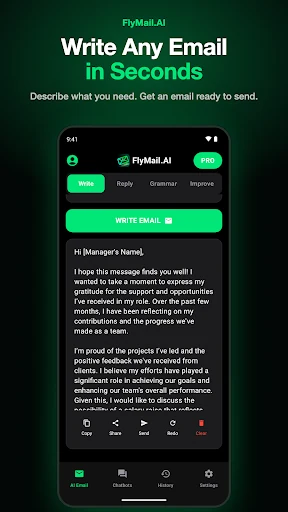
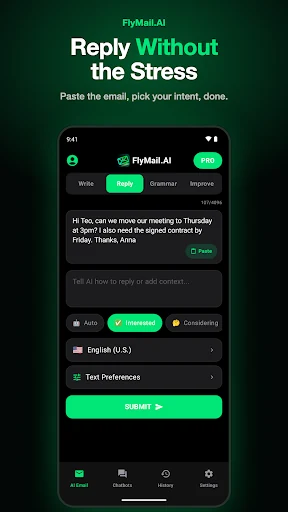
FlyMail is an AI email writer that lives on your phone. Once the app opens, the AI Email screen splits the work into Write for new emails, Reply for answering one you received, Grammar for fixing a draft, and Improve for rewriting it. Write turns one sentence into a full email with greeting, body and sign-off. Reply takes an email you pasted and drafts an answer. Grammar fixes spelling and punctuation, and Improve rewrites a draft you already have.
Beyond that, there are 30+ writing tones, short, medium or long length, more than 20 languages, and a Chatbots tab with 30 specialized helpers such as Cold Outreach, Follow-Up Writer and Subject Line Generator. Drafts you have already generated stay in the History tab, so you can reopen one on the download day or a week later, and the App Store listing says you can dictate a request by voice when typing on a phone feels slow.
Device requirements
| Device | Store | Requirement | Listed name |
|---|---|---|---|
| iPhone | App Store | iOS 18 or later | AI Email Writer - Fly Mail |
| iPad | App Store | iPadOS 18 or later | AI Email Writer - Fly Mail |
| Mac with Apple silicon | App Store | Apple silicon Mac | AI Email Writer - Fly Mail |
| Android phone | Google Play | Free download with in-app purchases | FlyMail: AI Email Generator |
Both listings are the same product. If you are reading this on a desktop, scan the QR code on this page with your phone and it opens the right store for that device. Searching for the name works too.
Free download and FlyMail PRO
Downloading is free on both stores. Some features need FlyMail PRO, which you buy inside the app. The App Store lists PRO options from $5.99, a $49.99 plan and a $99.99 lifetime plan. Check the store page for the price in your country before you buy.
We won't give you a count of free drafts, because it can change. Install it, write one email, and see whether the free version covers how you work. For comparisons with other apps, our page on the best AI for email writing goes through the options.
Your first email in under a minute
- Open FlyMail and stay on the Write tab.
- Type one sentence about what you need, for example: tell a client the delivery is late, new date is [date].
- Pick Email or Messenger, a length, and a tone such as Friendly or Formal.
- Tap Write Email.
- Read the draft. Fix any date, name or number that looks off, or tap Redo.
- Tap Copy, Share or Send and paste it into Gmail, Outlook or Apple Mail.
FlyMail is not an email client and never reads your inbox. You bring the text in and carry the result out. Specific requests give usable drafts; vague ones give generic drafts that may invent details, so always read before sending.
Android users and the other pages
The Android version has the same Write, Reply, Grammar and Improve tabs. If you want more on how it works on that platform, our Android email writing app guide covers it. For the full overview of the product, see the page about our AI email writer, and for company details such as the developer and release history, see FlyMail brand facts. Before you paste a client thread into any app, you probably want to know where it goes. ATN Marketing SRL says on the App Store listing that it does not sell or share your data.
Frequently asked questions
Is the FlyMail app free to download?
Yes, FlyMail is a free download on the App Store and Google Play. The download costs nothing; if you want every mode and all 30 chatbots without restrictions, that comes with FlyMail PRO, which you buy inside the app.
Does FlyMail work on iPad and Mac?
Yes, FlyMail runs on iPad with iOS 18 or later and on Apple silicon Macs through the App Store.
Is there a FlyMail web version or browser extension?
No, FlyMail is a mobile app only, plus Apple silicon Macs through the App Store. There is no website tool or browser extension.
What is FlyMail called in the stores?
On the App Store it is "AI Email Writer - Fly Mail", and on Google Play it is "FlyMail: AI Email Generator". Both are the same app by ATN Marketing SRL.
Can I download FlyMail from my computer?
You can open the store pages on a computer, but the app installs on a phone, tablet or Apple silicon Mac. Scan the QR code on this page with your phone to open the right store.
Get FlyMail on your phone
Free download for iPhone, iPad and Android. Write, reply, fix grammar and change tone in one app.